

A plugin for Hermes Agent · free and open source

Paste anything into Hermes.
Keep its shape.

Web pages arrive as clean Markdown, screenshots stay next to the words they belong to, and Finder files come in as real attachments. The model reads what you meant.

hermes plugins install rich-paste
Watch the 65-second demo

MIT license · macOS · Hermes Agent 0.23 or later · Source on GitHub

Hermes Desktop
Hermes today

All the text goes first, every image after it. The model pins Anna's second receipt on Chloe.

Reply without the plugin: Anna $23.15, Ben $0, Chloe $155.61. Wrong.
With Rich Paste

Each image sits right after its name. Every amount is right.

Reply with the plugin: Anna $116.16, Ben $0, Chloe $62.60. Right.
Recorded live in Hermes Desktop: the same three receipts and the same model (Qwen3.8 Max), with and without the plugin.

Demo

See it in 65 seconds

Receipts, a Wikipedia section, a contract folder and a voice memo, pasted into Hermes with and without Rich Paste.

What it keeps

Everything you paste, the way you meant it

Web pages arrive as Markdown

Copy part of any page and paste. Rich Paste turns it into Markdown the model can read, with an Undo right below the composer.

  • Headings, links, lists, tables and code keep their structure
  • The page's images are downloaded and placed where they were
  • Preview the draft before you send it
  • New in 0.3.0: select all on a page and only the article comes along, with “Restore full page” one click away
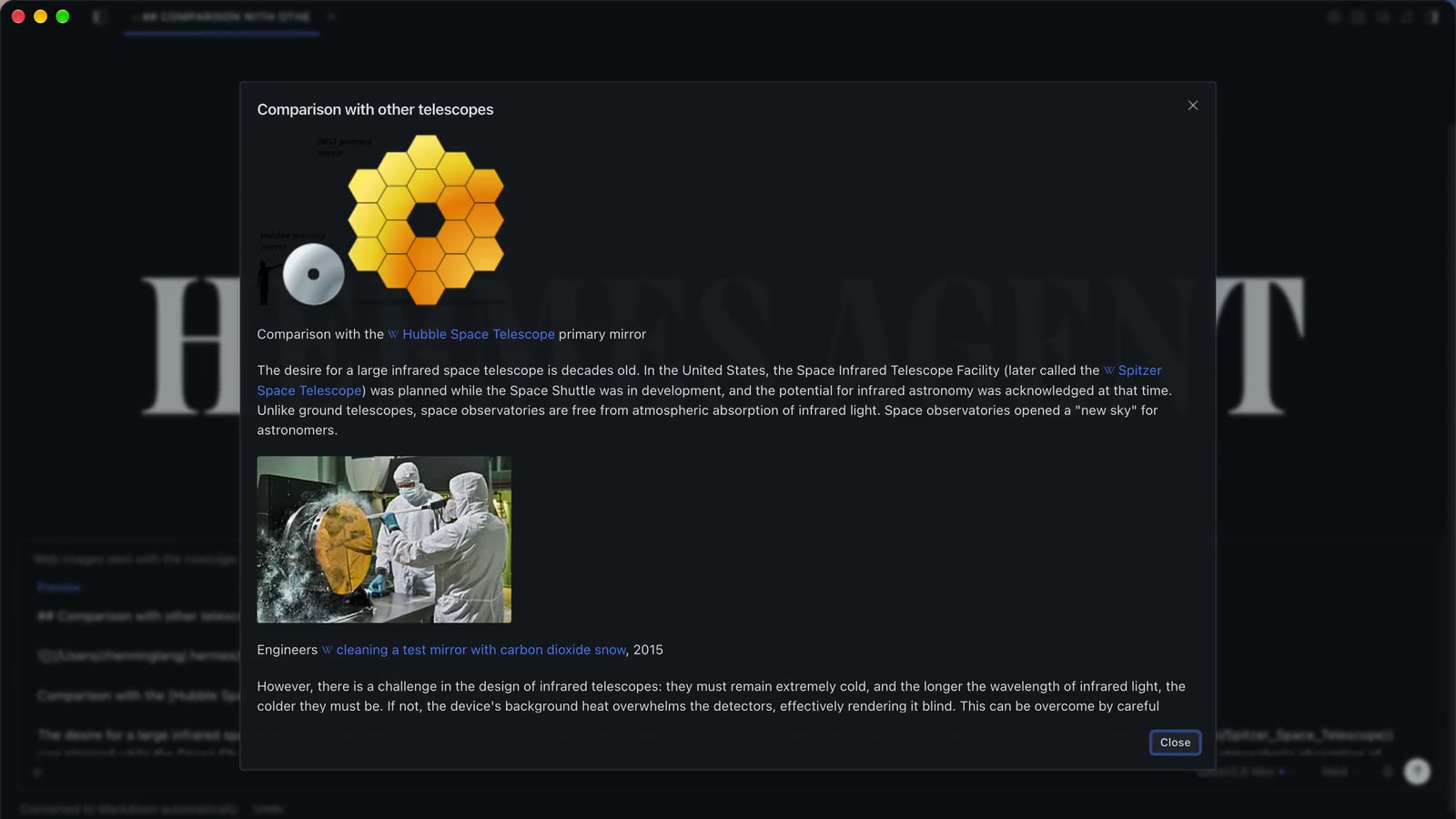
Preview
Preview of a pasted Wikipedia section: headings, links and both images in place.

Screenshots stay where you paste them

Each screenshot becomes a “Screenshot N” block right after what you typed, and reaches the model at that spot instead of piled up at the end of the message.

Several images per paragraphHermes todayRich Paste
Correct readings, kimi-k318/3030/30
One image per paragraph30/3030/30

Synthetic monitoring screenshots, “the CPU reading of each machine”, 5 rounds × 6 readings. The typical miss reads “2, 1, 3 images” as “2, 2, 2”. Run it yourself

Hermes Desktop
Composer with three Screenshot blocks placed inside the sentence.

Finder files, folders and voice memos

Copy several files and folders in Finder and paste: each becomes a Desktop block. Files go as attachments, folders as references, images in place.

  • TIFF, HEIC, BMP and AVIF are sent as PNG
  • Paste an audio file and click Transcribe: Hermes's own speech-to-text writes the transcript
  • You are asked before any model download or cloud upload
Files and folders
Voice memo

Install

Up and running in a minute

  1. Install the plugin

    It is listed in the Hermes plugin catalog.

    hermes plugins install rich-paste
  2. Restart the gateway

    The image backend and the request middleware load with it.

    hermes gateway restart
  3. Turn on the desktop half

    In Hermes Desktop, open Capabilities → Plugins (or search “Rich Paste” in the command palette), switch it on and run Reload desktop plugins. Settings live under Settings → Plugins → Rich Paste.

Requires Hermes Agent 0.23 or later. Tested on macOS; on other systems drag files into the composer instead of pasting them from Finder.

FAQ

Questions

Does anything leave my machine?

Only the images of pages you paste are downloaded, over http(s); local and private addresses are refused. No telemetry and no other network calls.

Will it change my Hermes settings?

No. The plugin never changes your Hermes configuration, and only the outgoing request is rearranged, never your session history.

Which models benefit?

Any model that reads images, since the plugin decides where each image sits in the request. When Hermes treats a model as unable to see images, it moves each image description next to its label instead.

Why not just ask in the prompt?

The order is decided when Hermes builds the request: all the text first, all the images after. A prompt or a skill cannot change that, so the plugin rewrites the request itself.

Is this an official Hermes feature?

No. Rich Paste is an independent, MIT-licensed community plugin in the Hermes plugin catalog. It is not affiliated with Nous Research.

Try it on your next message

hermes plugins install rich-paste
View on GitHub
